May 4, 2026 • Sanjay Gupta • 10 min reading time • Prices verified June 24, 2026
Amazon Echo Show vs. Echo Hub vs. Echo Spot: Picking the Right Alexa Display
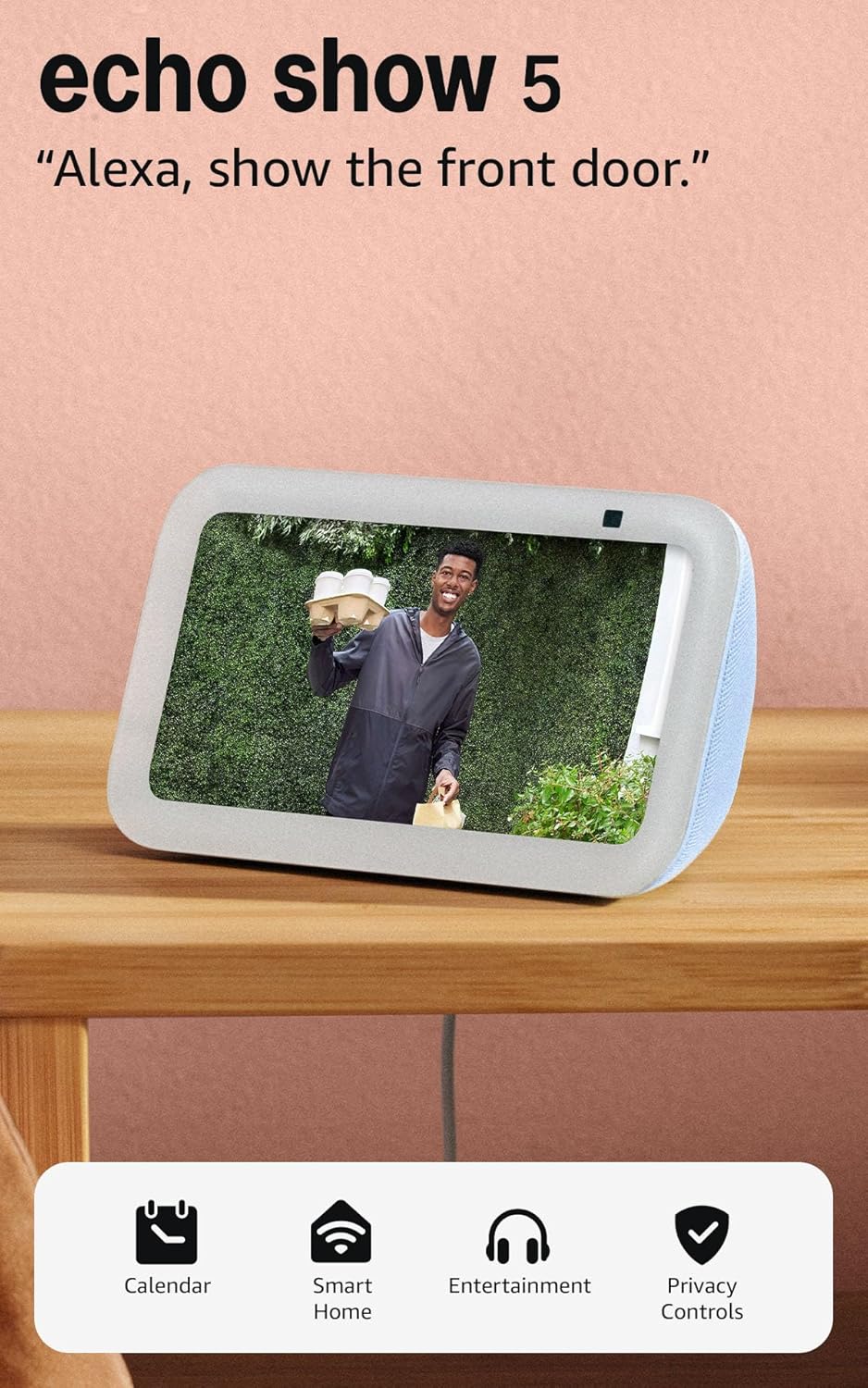
If you’ve ever stood in the smart-home aisle — or its digital equivalent — and stared at a wall of Amazon Echo devices wondering what the difference actually is, you’re in good company. An Echo device is a voice-activated speaker or screen that responds to “Alexa” and can control smart-home gadgets (lights, locks, thermostats, cameras), play music, show videos, answer questions, and more. The display versions add a touchscreen on top of that. The confusion is understandable: Amazon currently sells the Echo Spot, Echo Show 5, Echo Show 8, Echo Show 11, Echo Show 15, and the Echo Hub — six different screens with overlapping names and very different purposes. This guide cuts through the noise and helps you decide which one actually belongs in your home, room by room.
The Lineup at a Glance
Before diving into use cases, it helps to understand what each device is fundamentally for — because Amazon has quietly sorted them into two philosophies.
Media-first displays (Echo Show family + Echo Spot): These are hybrid smart speakers with screens. They play music, stream Prime Video and Netflix, display recipes, show Ring camera feeds, answer Alexa voice commands, and run a clock face when idle. The screen is a bonus on top of a speaker.
Control-first display (Echo Hub): This is a dedicated smart-home wall panel. It has no speaker of its own worth mentioning, cannot stream music in any meaningful way, and is explicitly designed to be a touchscreen dashboard for controlling Zigbee, Matter, Wi-Fi, and Bluetooth devices. Its value is the hub radio inside — it can directly talk to Zigbee gadgets without needing a separate bridge device.
Once that split is clear, the decision tree simplifies considerably.
By the Numbers
| Device | Screen Size | Built-in Hub Radio | Speaker Quality | Approx. Retail |
|---|---|---|---|---|
| Echo Spot | 2.1 in (round) | No | Compact mono | ~$80 |
| Echo Show 5 | 5.5 in | No | Compact stereo | ~$90 |
| Echo Show 8 | 8 in | No | Improved stereo | ~$150 |
| Echo Show 11 | 11 in | No | Dual stereo | ~$230 |
| Echo Show 15 | 15.6 in | No | Stereo + sub | ~$300 |
| Echo Hub | 8 in | Yes (Zigbee/Matter) | None (line-out only) | ~$180 |
Prices as of May 2026; actual street prices vary.
Who Should Buy the Echo Show 15
The Echo Show 15 is the easiest recommendation in this lineup for anyone building out a kitchen-centric smart home. TechRadar’s Echo Show 15 coverage describes it as “a genuine home hub in a large-screen package,” and that matches what long-term owners consistently report: they are not using one feature at a time. Reviewers describe actively running Google Calendar side-by-side with a Ring camera feed, checking thermostat status, streaming a recipe video, and dimming the lights — all without switching apps or picking up a phone. That parallel multitasking is the Show 15’s actual value proposition, and at 15.6 inches it has the real estate to make it work without feeling cramped.
A specific and underappreciated angle from owner reviews: people who previously used an iPad in the kitchen cite splash resistance and heat tolerance as their primary reason for switching. A countertop device purpose-built to live near a sink and stove is a meaningfully different category than a tablet you’re nervous to prop up next to a boiling pot.
The Alexa+ capability — Amazon’s expanded AI layer that consolidates lights, cameras, fans, and third-party apps into a single conversational interface — shows up repeatedly in Echo Show 5 and Show 15 owner reviews as the actual reason they find the device indispensable. Where Alexa used to require specific commands for each smart device, Alexa+ allows more natural, multi-step requests. More on whether that costs extra in the FAQ below.
If X, then Y: If your primary use case is a kitchen command center — streaming, camera monitoring, calendar, appliance control, recipe lookup — the Echo Show 15 is the one to buy. It earns its price premium over the Show 8 or Show 11 because the extra screen real estate enables genuine simultaneous use, not just sequential.
Who Should Buy the Echo Hub
The Echo Hub is the most misunderstood product in this lineup, and the review polarization reflects that. Enthusiast owners describe it as solving a very specific problem: in smaller apartments with Zigbee smart curtains, blinds, or sensors, adding a hub radio directly to the wall panel eliminates the need for a separate Zigbee bridge plugged into a router. One consolidated device, one fewer point of failure. TechRadar’s Echo Hub review notes its appeal is narrowly defined — “it’s for people who know exactly what a Zigbee hub is and know they need one.”
Critical reviews, however, are sharp. Users who expected it to function like an Echo Show with a wall-mount option describe frustration with its sluggish interface and near-total absence of media capability. One recurring complaint in aggregated reviews involves return logistics — one reviewer specifically noted Amazon directed them to a physical drop-off location 45 minutes away, an atypically poor return experience relative to most Amazon hardware.
The decision rule here is unusually clean: the Echo Hub is worth buying if and only if you have Zigbee or Matter devices that currently require a separate hub to function and you want a wall-mounted control panel. If you don’t know what Zigbee is and aren’t running specialized smart-home hardware, stop reading this section and go back to the Echo Show lineup.
If X, then Y: If you already have Echo Show devices in your main living areas and your only gap is Zigbee range in a secondary zone (bedroom, hallway, laundry room), the Echo Hub fills that gap precisely. If you’re expecting it to replace an Echo Show for music, video, or voice responses, it will disappoint you.
Who Should Buy the Echo Spot (and Who Should Buy the Show 5 or 8)
The Echo Spot occupies a category its predecessor — the original round Echo Spot — failed to clearly define. The 2024-generation model, with its 2.1-inch circular display, is unambiguously a bedside device. Owner reviews show a remarkably consistent buyer archetype: people who avoided Alexa for years, finally relented, and credit the Spot’s clock-face customization and unobtrusive size as the reasons they converted. These are not smart-home power users. They want a smart alarm clock that can answer a question at 2 a.m. without a bright tablet screen flooding the room.
CNET’s overview of Echo devices describes the Spot as “the one for people who want Alexa in the bedroom without committing to a full smart display,” which is accurate. The speaker is competent for an alarm and background music in a small room. It is not a kitchen speaker, not a video device in any practical sense, and not a hub.
The Echo Show 5 is the Spot’s natural upgrade if you want a slightly larger clock face, a camera for video calls, and a more capable speaker — at roughly the same price tier. The Echo Show 8 steps up again with noticeably better audio and a larger frame, which makes it useful in a medium-sized bedroom or a home office where music quality matters.
Wirecutter’s smart display buying guide (via NYT) notes that for most people who “just want Alexa with a screen,” the Echo Show 8 represents the best balance of size, audio, and price in the Show lineup.
If X, then Y:
- Bedside alarm, minimal footprint, clock-face focus → Echo Spot
- Bedside with video calls and better audio → Echo Show 5
- Home office or medium room, music matters → Echo Show 8
- Kitchen command center → Echo Show 11 or Echo Show 15
- Zigbee/Matter hub + wall panel → Echo Hub
Frequently Asked Questions
Can the Echo Hub replace an Echo Show for music and voice responses?
No — and this is the Hub’s most common source of buyer regret. The Echo Hub has no speaker worth using for music playback. It can technically output audio via a 3.5mm line-out jack to a separate speaker, but that is a deliberate workaround, not a feature. For voice responses, Alexa will technically respond through a connected audio output, but the experience is awkward. If you need music and voice in a room, pair the Hub with a separate Echo speaker rather than expecting it to serve both purposes.
Does the Echo Show 15 work as a standalone TV or does it need a Fire Stick?
The Echo Show 15 has Fire TV built in — no separate Fire Stick is required. You can stream Prime Video, Netflix, and other supported services directly through the device. The 15.6-inch screen makes this genuinely usable for light TV viewing in a kitchen or utility room, though it is not a replacement for a living-room television for most households.
Will the Echo Spot work as a bedside alarm if the internet goes out?
This is a common concern and a fair one. As of 2025-2026 firmware, Amazon Echo devices including the Spot rely on a Wi-Fi connection to process most Alexa commands. However, alarms and timers that have already been set are stored locally on the device and will continue to fire even if your internet connection drops overnight. What won’t work without internet: setting new alarms by voice, music playback, smart-home control, and questions. For a set-it-before-bed alarm clock function, an outage is unlikely to disrupt you.
Can I see my Ring or Reolink cameras on the Echo Show 11?
Ring cameras integrate natively with all Echo Show devices — you can say “Alexa, show me the front door” and the feed appears on screen. Reolink is a different story. Reolink’s Alexa skill has historically offered limited compatibility, and direct live-view on Echo displays has not been a reliable feature across all Reolink models. Before buying, verify your specific Reolink camera model against Amazon’s current Alexa skill compatibility list. Ring users can buy any Echo Show without hesitation on this point.
What is Alexa+ and does it cost extra?
Alexa+ is Amazon’s expanded AI assistant layer introduced in 2025 that enables more natural, multi-step voice requests and consolidates control of third-party smart devices into a single conversational interface — rather than requiring a specific skill or exact phrasing for each device. As of May 2026, Alexa+ is available as part of an Amazon Prime membership at no additional charge for Prime subscribers. Non-Prime users can access a limited version of Alexa+ or subscribe separately; Amazon’s pricing page has current details. It is not a hardware upgrade — it’s a software capability that rolls out to supported Echo devices via the cloud.
Is the Echo Hub worth buying if I already have Echo Show devices throughout my home?
Only if you have a specific Zigbee or Matter device that currently isn’t connecting reliably and is located in a room without good hub coverage. If your Echo Shows are already handling your smart-home control adequately, adding an Echo Hub primarily adds a dedicated wall-panel interface and Zigbee radio range — not meaningfully better voice response or media capability. For most users who already have a functioning Echo Show ecosystem, the Hub is an edge case, not a must-have upgrade.
The Bottom Line
Amazon’s display lineup looks confusing from the outside, but the logic becomes clear once you understand the media-first versus control-first split. The Echo Spot and Echo Show family are speakers with screens — buy whichever size fits your room and use case. The Echo Hub is a smart-home control panel for people running Zigbee or Matter hardware who want a wall-mounted dashboard. Buying a Hub without that specific use case is a recipe for disappointment.
For most households entering the Alexa ecosystem in 2026, the Echo Show 8 is the sensible starting point: competent speaker, useful screen, reasonable price. If your kitchen is where your smart home actually lives, move straight to the Show 15 — owners who use it as a genuine command center consistently report it earns the premium. And if all you want is a smart alarm clock that doesn’t light up your bedroom like a tablet, the Echo Spot finally does that job well.